GreifbAR: Mixed Reality Surgical Training
A mixed reality simulator that teaches surgical staff to tie knots: real thread, real hands, a physical board, and a digital trainer overlaid above the table that guides each step while a sensor scores every knot in real time.
- 4 Progressive Training Levels
- BMBF-funded Research
- Peer-reviewed 2025
Context
GreifbAR was a three-year BMBF-funded research initiative (October 2021 to September 2024). DFKI led the project and built the ML-based hand tracking, capable of capturing hand positions and tools precisely in real time, even under occlusion and in motion. Charité contributed the surgical curriculum and clinical validation. Universität Passau (Chair of Psychology, Human-Machine Interaction) ran the HCI research, evaluating the demonstrators for comprehensibility, learning effectiveness, and acceptance against classical methods. NMY was the experience design and development studio, and an active research partner, not downstream of the research. The application itself was the research instrument: the product variants NMY designed were how the research hypotheses got tested.
I ran the NMY side end-to-end and led the weekly cross-consortium meetings with Charité, DFKI, and Passau. Research environments move differently than agencies. Keeping the design process moving across stakeholders with different cadences was as much of the work as the design itself.

Early prototype, visualising the MVP goals.



The Problem
Surgical knot-tying is one of the first things a surgeon learns and one of the hardest to learn well. Reliable motor memory takes hundreds of repetitions, but structured practice time in surgical curricula is scarce. It is usually relegated to optional workshops or informal self-study, not built into formal training. The digital tools that existed mostly kept the learner in a passive, observing role, while hands-on training conveys the implicit, tactile knowledge medicine depends on but is time- and personnel-intensive.
The result: early-career surgical staff arrive at the operating table having had limited opportunity to practise the fundamentals.
Charité came in with a solid knot-tying flow. What did not exist yet: how a user would be onboarded, how the levels would progress, what the UI would look like inside a mixed reality headset, how it would feel to someone who had never worn XR, and how to translate Passau's research parameters into product decisions that could actually be tested in the application.
The Approach
The teaching method comes from game design: the challenge / cadence / skill framework, which treats learning and play as structurally similar. Introduce a concept, create space to practise it, then raise the bar. Mapped onto surgical training, this produced a four-step rhythm: prepare and explain, demonstrate and explain, practise with feedback, deepen through error-free repetition. Every session and sub-level follows it. It is the scaffold that makes the level progression coherent rather than arbitrary.
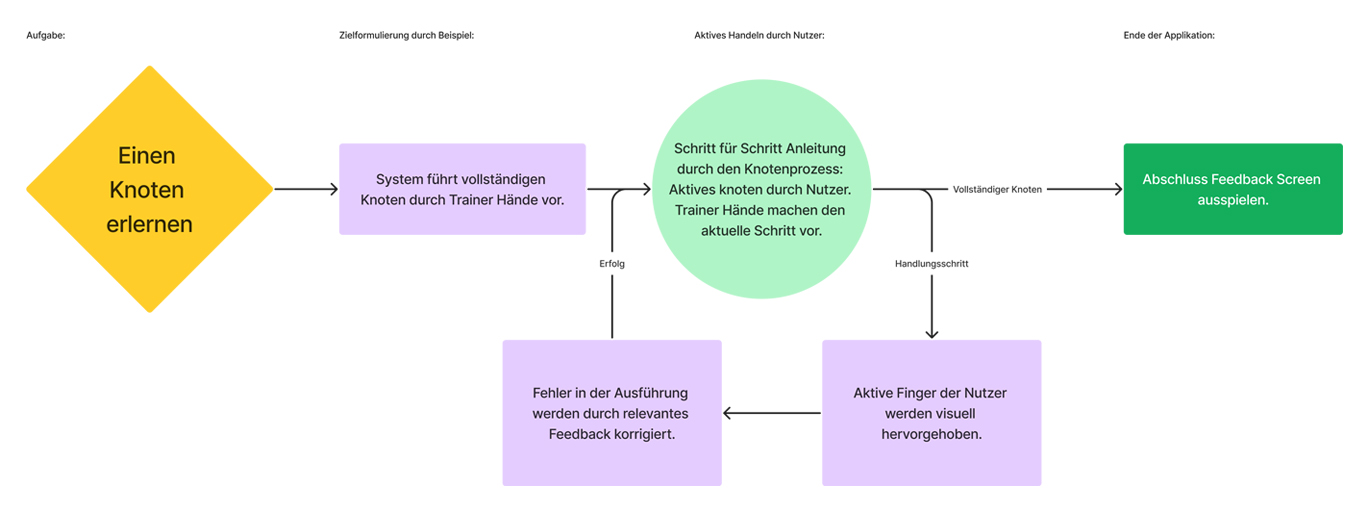
A deliberately abstracted UX macro-flow, used to align stakeholders on the overall process before detailing.
Within that framework I defined four progressive training levels:
- Level 1 — Technique. Step-by-step guided knot-tying, full UI active: a step controller advances through each movement, digital trainer hands demonstrate each sub-step, a feedback screen confirms progress. The learner is never unsupported.
- Level 2 — Quality. Technique plus tension feedback. The Knotenbank's sensor feeds real-time data into the UI: the board lights green for correct tension, yellow or orange when under or over. The learner starts to feel what a correctly tightened knot requires, not just how to form it.
- Level 4+ — Advanced. Constrained workspace, multiple knots in sequence, to close the gap between simulator and operating room. Not fully realised in the prototype: the physical challenge setup depends heavily on the training location.
- Level 3 — Performance. Full tracking, no assistance. The system records hand positions, tension, and timing, and surfaces it all in the post-session debrief. The learner ties unguided.
This mirrors how surgical skills are actually taught: structured support, deliberately withdrawn as competence develops. The approach was later evaluated using the first two levels of Kirkpatrick's four-level model (1959).
The Work
Onboarding and System Setup
The hard part here was hardware integration, not headset onboarding. GreifbAR runs on a physical practice board, the Knotenbank, a Charité original development. No digitised knot-tying board existed before this project that could feed tension data back to software in real time. For the overlays to work, that board has to sit in the exact same coordinate system as the Varjo XR-3's tracked space. If the registration is off, the trainer hands and feedback UI land in the wrong place. If the sensor is not reading, Level 2+ is broken before it starts.
So both checks became two lightweight in-app prompts at the start of every session, not a technical setup screen:
- Position check — the headset reads a QR marker on the Knotenbank to lock its position in tracked space.
- Sensor check — "Pull and hold the string until the indicator turns green" confirms the tension hardware responds.
Standard headset onboarding (safety, touch-selection walkthrough, gaze calibration) runs alongside, but that is one-time scaffolding a learner can skip once experienced. The spatial calibration and sensor check run every session, every time.
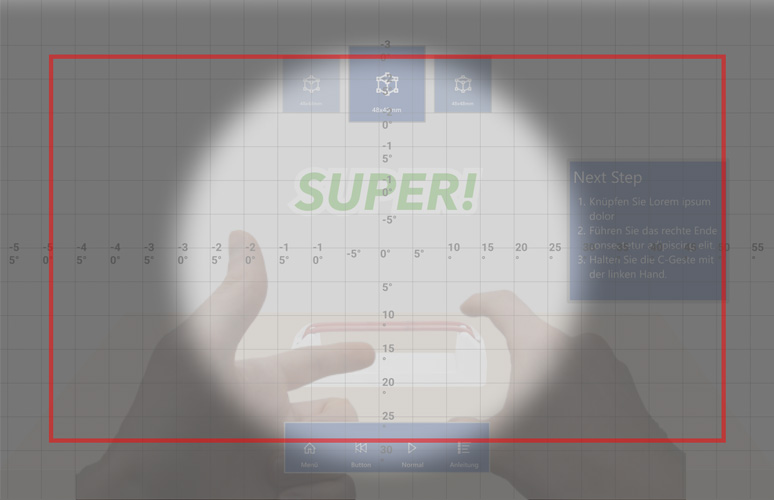
The workspace viewfield: a rule system I built from Google's Hololens and VR guidelines and Meta/Oculus resources, so critical UI stays inside the optimal gaze zone.
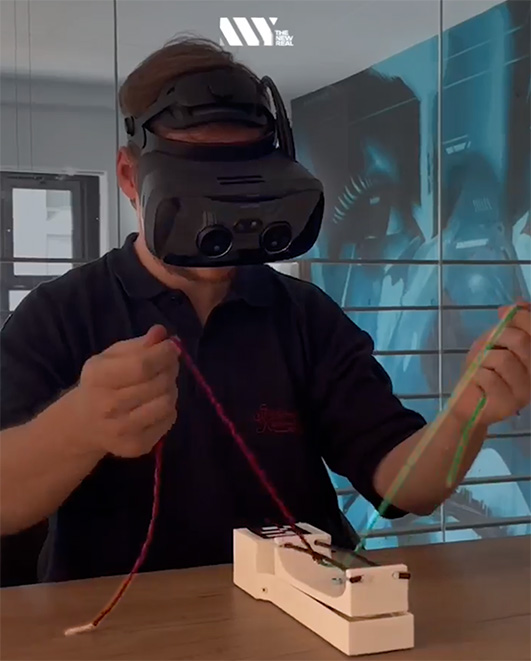
The Knotenbank registered in the headset's tracked space — a QR marker locks the board's position so the digital overlays align with the real board.
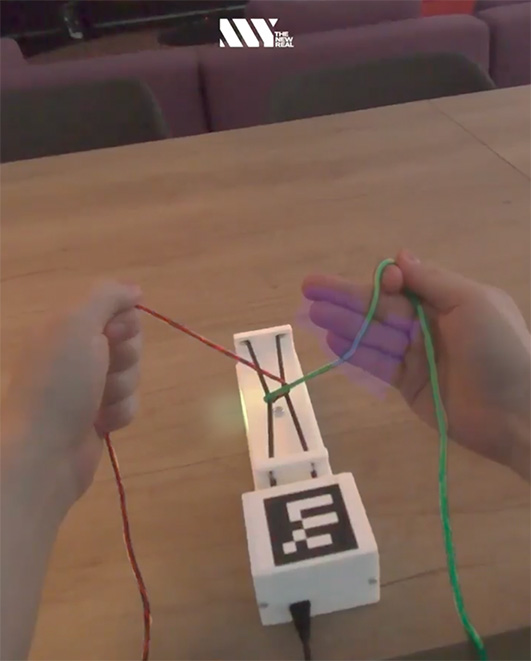
The tension sensor in the Knotenbank has an indication to feedback the tension quality:
Green = Good,
Yellow = Too much,
Red = Missing Tension.
UI Design for Mixed Reality
This was the hardest design problem in the project. MR UI standards essentially do not exist: the field was too new, the platforms too few, the use cases too varied. For a full-colour pass-through headset like the Varjo XR-3, most VR guidelines apply only partially.
I synthesised guidance from Meta VR design documentation, Google's VR sticker sheet (angular field-of-view grid placement), DIN EN ISO 9241, and GDC post-mortems on in-world UI. Then I ran six mockup rounds testing two fundamentally different approaches:
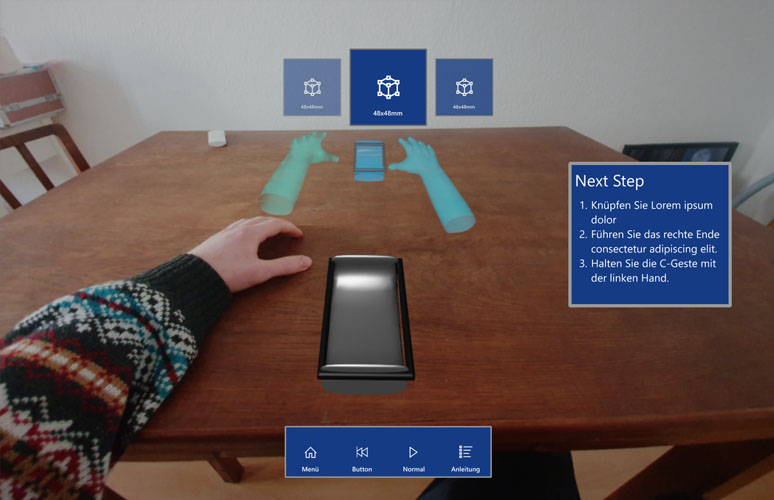
- World Space UI
Floating panels anchored to the user's view. Familiar, readable, robust, but it fills the workspace with UI that hovers in front of whatever the learner is doing. In a task where the hands must stay visible and unobstructed, it competes with the training.
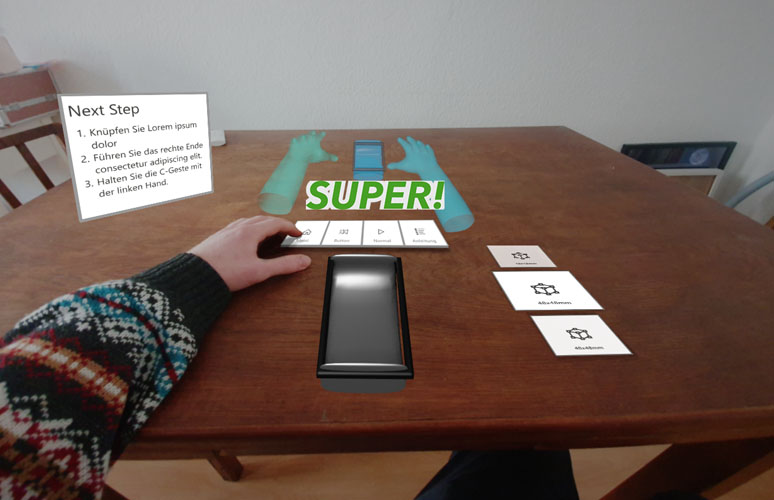
- Haptic UI
Controls placed on the real table surface, physically mapped to the working area. The menu sits in the learner's periphery, the work surface stays clear, and the trainer hands stay visible above the UI. The interaction is grounded in the space where the task happens.
After six variants across both approaches, Mock-Up Test 6 (Haptic UI, variant 2) was the recommendation: menu outside the arm workspace, trainer hands always visible, gaze rotation minimised to keep attention on the knot.
Technical constraints shaped every decision. Text in AR requires positive polarity, dark text on light. Pure white (#FFFFFF) is too bright at close viewing distances in a pass-through headset, so was used for surfaces. Critical elements had to sit within the Google Angular Grid's optimal gaze zone. And the z-axis, depth into the space, is a layout dimension flat-screen UI simply does not have.
Interaction Model
The system uses three input modes by context: touch and gaze for menu navigation between sessions; voice commands ("Pause", "Weiter", "Wiederholen") during training, where the hands are occupied; and a physical in-reach button interface at the workspace edge for moments where voice is not reliable.
One design decision worth noting: the digital trainer hands could switch between 3D-modelled CG hands and a volumetric capture of a real surgeon. Passau wanted to test which produced better learning outcomes, so both had to be built and switchable mid-session. Designing for that research variable shaped how the trainer-hand system was architected from the start.
Feedback runs in three layers: real-time visual and audio cues during the session (plus live tension data at Level 2+), a categorised error breakdown after each run, and a full performance summary at the end, usable by both learner and supervising instructor.
The Result
GreifbAR delivered a functional prototype for surgical knot-tying training and is being used by Charité and DFKI in clinical training contexts. The aim was never to replace hands-on training, but to raise a learner's baseline so they enter advanced training with expert surgeons more effectively, especially as the growing shortage of skilled healthcare staff makes efficient digital training methods more important.
In 2025 the consortium published peer-reviewed research on the project: Human-Centered Design of Mixed Reality Applications in Medical Education – GreifbAR (in: Virtuelle Beteiligung, reale Teilhabe, Campus Verlag).
Publicly funded by the BMBF. Project duration: October 2021 to September 2024. Platform: Varjo XR-3.